Content
When comparing 3D scanners, two specifications appear almost everywhere: accuracy and resolution. Because both are measured in millimeters and smaller values are usually advertised as better, many people assume they describe the same thing. In reality, they measure two completely different aspects of a scan. Accuracy determines whether a digital model matches the real object's dimensions, while resolution determines how much fine surface detail the scanner can distinguish. Understanding the difference between 3D scanner accuracy and resolution is essential for choosing the right scanner, whether you're reverse-engineering mechanical parts, preparing models for 3D printing, or preserving delicate works of art.
What Is Accuracy in a 3D Scanner?
Accuracy describes how closely a scanned model matches the real dimensions of a physical object. In other words, it measures the difference between the object you scan and the digital model the scanner produces. The smaller the difference, the higher the scanner's accuracy.
For example, imagine measuring a circular bore on an industrial housing with a physical caliper, which shows a diameter of exactly 28.34 mm. After scanning, the software reports a diameter of 28.410 mm for that same feature. The scanner has introduced a measurement deviation of 0.07 mm. Although this difference is almost invisible to the eye, it can be significant in applications such as reverse engineering, quality inspection, or manufacturing, where components are expected to fit together with high precision.
Because accuracy determines whether dimensions can be trusted, it is one of the most important specifications for engineering applications. A scan with excellent accuracy can be measured, modified in CAD software, or even reproduced through CNC machining or 3D printing with confidence that its geometry closely matches the original object.
A simple way to think about 3D scanner accuracy is to imagine measuring an object with a ruler. If the ruler itself is incorrectly calibrated, every measurement will be wrong, no matter how carefully you use it. Likewise, a scanner with poor accuracy may produce a model that looks convincing but contains dimensional errors that affect how the object functions in the real world.

What Is Resolution in a 3D Scanner?
Resolution describes the smallest surface features a 3D scanner can distinguish and reproduce. Unlike accuracy, which focuses on dimensional correctness, resolution determines how much fine detail remains visible in the final digital model. A smaller resolution value means the scanner can capture increasingly finer surface features.
Imagine scanning an antique coin with tiny engraved letters and decorative patterns. A scanner with high resolution can clearly separate each groove, preserving sharp letter edges and delicate textures. A scanner with lower resolution may still reproduce the overall size and shape of the coin correctly, but many of the smallest engravings begin to blend together. The lettering appears softer, fine textures fade, and subtle surface details are gradually lost.
This is why 3D scanner resolution is especially important when scanning objects rich in fine detail. Jewelry, sculptures, dental models, fossils, historical artifacts, and miniature models all contain intricate features that contribute to their appearance and value. Higher resolution allows these subtle details to be preserved, resulting in digital models that look more faithful to the original object.

Accuracy vs Resolution: Two Different Questions
Although accuracy and resolution are often listed side by side on a specification sheet, they answer two completely different questions. Accuracy asks whether the scanned model has the correct dimensions, while resolution asks whether it preserves the smallest surface details. A useful way to understand this difference is to imagine inspecting a tiny mechanical screw. Your eyes determine how clearly you can see each thread wrapped around the screw, while a ruler determines whether its length and diameter are measured correctly. Better eyesight reveals finer details, but only an accurate ruler can provide trustworthy measurements. In the same way, resolution determines what a scanner can distinguish, while accuracy determines whether those measurements reflect reality.
Because these specifications measure different aspects of scan quality, improving one does not automatically improve the other. A scanner may capture every tiny engraving, scratch, and texture on an object while introducing slight dimensional errors that make the model unsuitable for manufacturing. Conversely, another scanner may reproduce the object's dimensions with exceptional precision but simplify its finest surface details because those features fall below its resolution limit. Neither result is inherently "better"—it simply depends on what the scan is intended to achieve.
| Specification | Accuracy | Resolution |
| Simply means | How correct the measurements are | How much detail can be captured |
| Main question | Is the size correct? | Are the smallest details preserved? |
| If it's too low... | Parts may not fit together correctly | Fine details become blurred or disappear |
| Best suited for | Engineering, reverse engineering, inspection | Jewelry, art, cultural heritage |
What Determines Accuracy and Resolution?
Understanding the difference between accuracy and resolution is only half of the story. Another common question is: what actually determines these specifications? Is it the camera? The light source? The software? The answer is that neither accuracy nor resolution depends on a single component. Instead, both are the result of an entire scanning system working together, although different parts of that system play a larger role in each specification.
Accuracy is primarily influenced by the scanner's ability to measure geometry consistently. This begins with optical calibration, which precisely defines the positions of the cameras, projector, and lenses before the scanner ever leaves the factory. Even tiny calibration errors can affect dimensional measurements. During scanning, software also plays an important role. Modern 3D scanners continuously align thousands of captured frames into a single model. If the tracking or alignment algorithms introduce small errors at each step, those errors can accumulate over time, reducing the overall accuracy of the scan. This is why professional scanners place such a strong emphasis on stable calibration and robust tracking algorithms rather than relying on hardware specifications alone.
Resolution, on the other hand, is more closely related to the scanner's optical system and its ability to distinguish tiny neighboring features. Higher-quality cameras and lenses can capture finer visual information, while denser structured-light projection patterns allow smaller surface details to be separated more clearly. Working distance also has a noticeable influence. As a scanner moves farther away from an object, each captured point represents a larger physical area, making extremely small features more difficult to distinguish. This is why many professional scanners provide different scanning modes or recommended working distances depending on the level of detail required.
Although these factors influence different aspects of scan quality, accuracy and resolution are ultimately the result of the entire scanning system rather than any single specification. Calibration, optics, image sensors, tracking algorithms, software processing, and even scanning distance all work together. For this reason, comparing scanners based solely on camera resolution or light source can be misleading. A well-designed scanning system achieves a balance between reliable measurements and detailed surface reproduction instead of optimizing only one parameter.
Projector + Cameras + Calibration + Algorithms → Accuracy
Projector + Cameras + Lens + Working Distance → Resolution
| Primary Influences | Accuracy | Resolution |
|
Optical Calibration |
✔✔✔ | ✔ |
| Tracking & Alignment Algorithms | ✔✔✔ | ✔ |
| Camera and Lens Quality | ✔ | ✔✔✔ |
| Structured-Light Projection Density | ✔ | ✔✔✔ |
|
Working Distance |
✔ | ✔✔ |
The influence of each factor varies between different scanning technologies and system designs.
Which One Should I Choose?
Instead of asking which specification is better, the more practical question is which one better matches your application. Different workflows place different demands on a 3D scanner, so understanding what you intend to scan is often more important than comparing specification sheets.
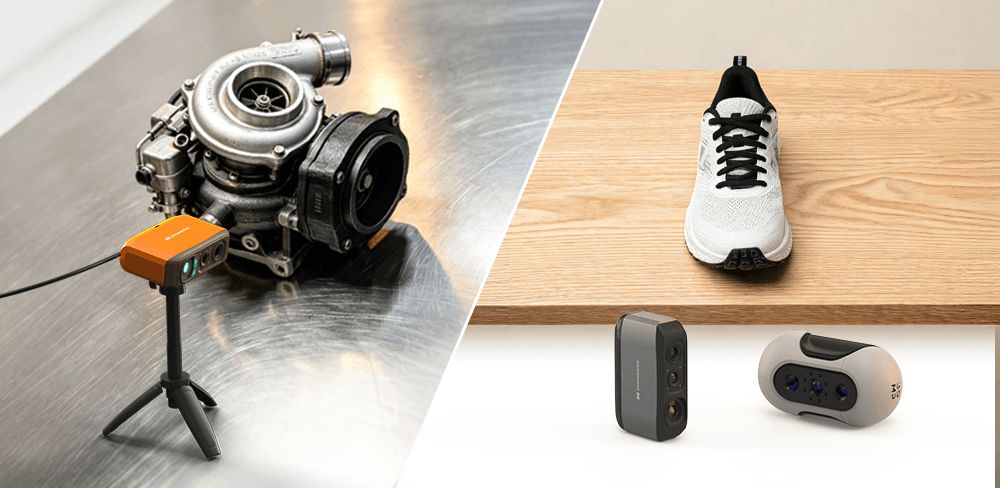
If your work involves reverse engineering, quality inspection, product design, or manufacturing, accuracy should be your highest priority. These applications depend on reliable dimensions because scanned models are often measured, modified in CAD software, or reproduced through machining and 3D printing. Even small dimensional deviations can prevent parts from fitting or functioning as intended. For users who primarily scan medium-sized mechanical parts, the 3DMakerpro Fox offers an excellent balance with 0.07 mm accuracy and 0.1 mm resolution, making it well suited for engineering, product development, and reverse engineering workflows.

If you are digitizing shoes, sculptures, or cultural artifacts, resolution is often the more critical factor. These objects are characterized by organic textures and intricate surface patterns where visual fidelity—not just measurement—is what gives the model its value. A higher resolution prevents small surface engravings and textures from blending together; for instance, while the 3DMakerpro Mole (0.1 mm resolution) can capture basic forms, the 3DMakerpro Moose (0.07 mm resolution) is significantly better at revealing the sharp diagonal weave of a shoe’s fabric that would otherwise appear softened. Furthermore, for professionals who need more than just geometry, the Moose excels in high-definition color mapping, offering vibrant 24-bit color fidelity that provides a more lifelike representation than monochromatic scans. In these workflows, the priority is to preserve the true aesthetic character and complex surface details of the original object.

Many projects naturally require a balance of both. For example, 3D printing benefits from accurate dimensions to ensure proper fit, while sufficient resolution preserves decorative textures and sharp edges. Digital archiving follows a similar principle: museums and researchers need models that are both dimensionally reliable and visually faithful to the original object.
Final Thoughts
Ultimately, accuracy and resolution are two sides of the same story. Accuracy ensures a scanned model reflects an object's true dimensions, while resolution preserves the fine details that define its appearance. Neither specification is inherently more important than the other—the right balance depends on what you plan to scan. By understanding what each parameter really measures, you can make informed decisions and choose a 3D scanner that delivers the results your projects actually require.


Featured collection
Medium-format
Save $210.00


Small-format
Save $245.00
Seal 3D Scanner