Content
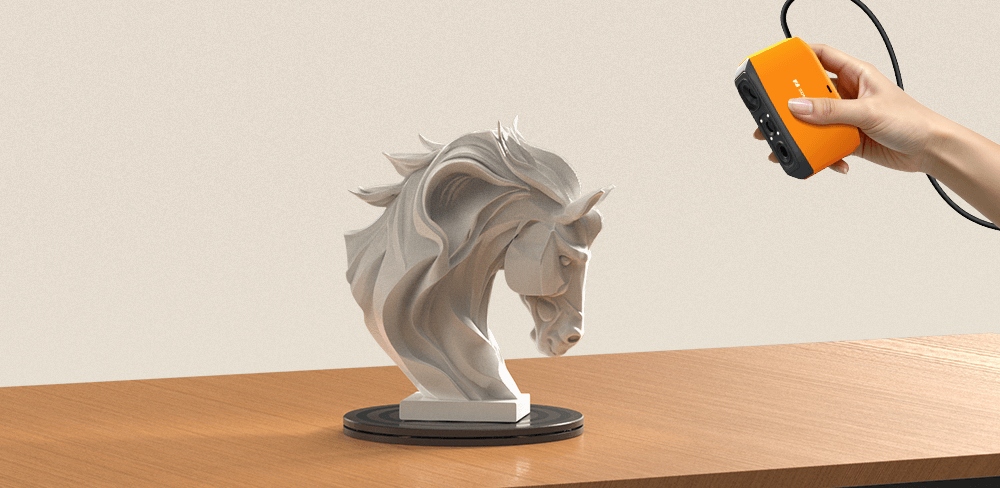
For many hobby users, a 3D scanner feels like one of those tools that looks impressive online but may not seem necessary in real life. It sits somewhere between a fun gadget and a serious creative tool. The real answer depends on what you like to build, fix, print, or collect. For makers, DIY users, miniature painters, model builders, and 3D printing enthusiasts, a scanner can quickly become far more useful than expected.
What makes a scanner valuable is not simply the ability to capture shapes. It is the ability to turn physical objects into reusable digital assets. A broken part can become a replacement file. A collectible can become a digital archive. A handmade object can become a printable model or a starting point for redesign. Instead of measuring everything manually or modeling from zero, you begin with real geometry already captured. Today, we are introducing the 3DMakerpro Fox 3D Scanner, which is designed exactly to make this transformation process intuitive, efficient, and accessible.

Why Hobby Users Actually Use 3D Scanners?
One of the most common reasons is 3D printing. Many users enjoy printing objects, but do not always enjoy building complex models from scratch. A scanner helps bridge that gap by converting real items into editable files. Props, figurines, toy parts, tools, home accessories, and handmade creations can all become part of a digital workflow much faster than traditional modeling.
Scanners are also useful for repair culture. Hobby users often want to fix something instead of replacing it. A missing bracket, snapped clip, cracked knob, or discontinued part can be recreated once the surrounding geometry is captured. This makes a scanner especially practical for users who enjoy restoring objects, modifying equipment, or keeping older items alive.
Then there is the creative angle. Artists, cosplayers, RC builders, tabletop gamers, and digital creators use scanners to generate references, prototypes, and textures. Real-world objects often provide more natural shapes and better ideas than starting from an empty software workspace.
Why Do Many Beginners Never Stick With It?
Despite the potential, many first-time users give up on scanning because the experience can feel more technical than expected. Some scanners require constant adjustments, careful alignment habits, or software that assumes prior knowledge. The hardware may look simple, but the workflow can feel intimidating.
Tracking loss is one of the most common frustrations. During a scan, if the software loses position, users often need to restart or spend time recovering alignment. For hobby users working in short free-time sessions, that kind of interruption matters more than technical specs.
Post-processing can be another barrier. Raw scan data often includes floating points, unwanted fragments, or messy surfaces. Experienced users may know how to clean these issues manually, but beginners usually want results that look usable right away. Ease of software matters just as much as hardware quality.

Why Fox Is Better Suited to Hobby Users?
This is where Fox 3D Scanner becomes especially relevant. Rather than being positioned as a complex industrial tool, Fox is built as a beginner-friendly medium-format structured light scanner for everyday creators. It is designed for users who want capable results without a steep learning curve.
Fox delivers up to 0.07 mm accuracy with 0.10 mm resolution, which is more than enough detail for many hobby workflows such as figurines, props, collectibles, tools, product prototypes, and custom parts. It captures detail well while remaining approachable for non-professional users.
Its scan range also fits the kinds of objects hobby users actually care about. With a single capture range of 200 x 100 mm and recommended object sizes from 40 mm to 1,200 mm, Fox sits in a practical middle ground. It is ideal for toys, helmets, hand tools, mechanical parts, craft objects, decor items, and medium-sized personal projects.

JMStudio Makes a Bigger Difference Than Most Users Expect
Fox 3D Scanner works with JMStudio, the dedicated scanning software for 3DMakerpro devices. JMStudio handles data capture, real-time preview, model generation, processing, and export formats such as OBJ, STL, and PLY, which means users can move files into Blender, CAD, or slicing software after scanning.
For beginners, the most useful part is workflow simplicity. Instead of requiring deep post-processing knowledge, JMStudio includes one-click cleanup functions for fusion, noise removal, and mesh simplification. That means fewer floating artifacts, cleaner geometry, and less time spent manually fixing scans.
This matters because many users lose excitement after the scan is complete. If cleanup takes longer than creation, the tool feels like work. When software shortens that step, users are far more likely to keep scanning.

Smarter Tracking Means Less Restarting
Fox also benefits from improved AI visual tracking and instant re-lock behavior. If tracking is lost during a scan, the system can recognize previously scanned areas and continue without forcing the user to start over. That creates a much smoother experience for new users who are still learning scanning movement and object handling.
In practical terms, this means hobby users spend less time troubleshooting and more time capturing usable data. That may sound small on paper, but in real use, it is one of the biggest differences between a scanner people enjoy using and one that stays in a drawer.
Because Fox weighs around 210 g, it is also lightweight enough for casual handheld sessions without feeling cumbersome. Ease of handling often matters more than raw power for personal projects.
So, Is It Worth It?
If someone only wants to scan one object out of curiosity, probably not. But for hobby users who regularly build, repair, customize, 3D print, collect, or create, a scanner can become one of the most useful tools in the workspace.
The key is choosing one that reduces friction instead of adding it. Fox 3D Scanner combines practical accuracy, a useful medium-object scanning range, lightweight handling, smarter tracking recovery, and beginner-friendly JMStudio software. That makes it much easier for new users to keep using the scanner long after the first unboxing.
For hobby users, a 3D scanner becomes worth it the moment it turns ideas into finished projects faster than doing everything by hand. Fox is designed to help that happen sooner.

Featured collection
Entry-levelMedium-format



Smart Grip